Do you still remember the callback hell from the previous article? Allow me to remind you of that horror.
getData(baseUrl + "/comments/1", (err, data) => {
  if (err) {
    console.log(err);
  } else {
    const postId = data.postId;
    getData(baseUrl + "/posts/" + postId, (err, data) => {
      if (err) {
        console.log(err);
      } else {
        const userId = data.userId;
        getData(baseUrl + "/users/" + userId, (err, data) => {
          if (err) {
            console.log(err);
          } else {
            document.getElementById("display").innerHTML = JSON.stringify(
              data,
              null,
              4,
            );
          }
        });
      }
    });
  }
});
But don’t worry, because in this article I will discuss how to escape from callback hell by using Promise.
What is a Promise?
Imagine you are ordering food from your favorite restaurant through an online application. When ordering, you don’t immediately get your food; there are several steps that must be taken such as preparing, cooking, and delivering the food to your home. During this process, you can do other things like watching TV, reading books, or working, without having to wait at the door.
In this scenario, the food ordering app gives you a “promise” that your food will arrive. You might also get status updates like “food is being prepared”, “food is being delivered”, and finally “food has arrived”.
Similarly in JavaScript, Promise is a way to manage asynchronous operations. When you create a Promise, it’s like making a promise that some value or result will be available in the future. In practice, a Promise can be in one of three states:
- Pending (Waiting): The state when a Promise is still waiting for the result of an asynchronous process, not yet fulfilled or rejected.
- Fulfilled (Fulfilled): When a Promise has obtained the expected result.
- Rejected (Rejected): When an error occurs and the Promise cannot provide the expected result.
By using Promise, you can write cleaner and more understandable code compared to traditional callbacks. You can use the .then() method to handle successful results and .catch() to handle errors.
Promise was not available from the beginning when Javascript was created. That’s why problems like callback hell emerged, because only the callback pattern was available back then. In 2012 a specification proposal for Promise was created, and only in 2015 was it formally standardized in ECMAScript2015, then implemented.
How to handle Promise?
Basically a Promise is an object that stores a value that is promised to exist at a certain time. Promise has 3 instance methods:
.then(), a method that will run if the Promise status has been fulfilled, and will execute the callback function inside it with arguments containing the value of the Promise. The.then()method can accept 2 arguments, namely fulfilled and rejected callbacks..catch(): A method that will run if the Promise status has been rejected, and will execute the callback function inside it with arguments containing the reason for rejection..finally(): A method that will run when all.then()and.catch()callbacks have finished executing. The callback in this method does not accept any arguments and is used to perform cleanup tasks or other final actions.
The following code is an example of Promise handling using the fetch() API which returns a Promise so it doesn’t block the execution of other functions.
The interconnected pattern between Promise methods is called Chaining. This is possible because every .then() and .catch() method also returns a Promise. The following diagram illustrates the flow of Promise execution.
If you have learned about object-oriented programming in Javascript, you can easily create chaining patterns, look at the following code:
Execution of Promise callbacks inside runtime
In the first article about the introduction to asynchronous programming, the javascript runtime, or the environment where Javascript is run, was discussed.
Promise and setTimeout() both have callbacks that will be called asynchronously in the future. Do they share the same queue space? If yes, then their callbacks will certainly be called in sequence. Let’s prove it, try to guess the output of the following code
After running, it turns out that the output from Promise appears first before setTimeout(). This is because Promise has its own queue called MicroTask queue. The following is a simulation of the previous code in the Javascript runtime.
Javascript Engine
Heap
Call Stack
Event Loop
Web API
API
Task Queue
MicroTask Queue
Understanding the order of asynchronous tasks in Javascript is quite challenging, similar to the specificity problem in CSS. However, this is very important, because many problems in Javascript application development can be solved with asynchronous programming.
Creating Your Own Promise
Creating a Promise is very easy (the hard part is understanding it 😀). Earlier I created a Promise named janjiMakanan that has a fulfilled value of 'Selamat makan'.
let janjiMakanan = new Promise((resolve, reject) => {
  resolve("Selamat makan");
});
The Promise janjiMakanan is an instance created from a promise constructor. It accepts a callback that will be called with 2 arguments: the resolve() and reject() functions. The naming of these two functions is conventional — you can name them anything you like. Here is their purpose:
resolve(value)This function is used to change the Promise status to fulfilled and return the promisedvaluethat will be handled by the.then()method.reject(reason): This function is used to change the Promise status to rejected and return the reason for rejection. Whenrejectis called, the Promise will fail and thereasongiven as the argument to the callback in the.catch()method.
When creating a new promise instance, the callback provided as an argument is executed synchronously. Therefore, if a heavy process occurs, it will still block the execution of subsequent code.
Static Promise Methods
The Promise constructor has several static methods that can be used without creating a Promise object (with new Promise()). Here are those methods.
-
Promise.resolve()Returns a Promise that is immediately fulfilled with the given value. -
Promise.reject()Returns a Promise that is immediately rejected with the given reason. -
Promise.all()Accepts an array of Promises and returns a Promise that will be fulfilled if all Promises are fulfilled, and rejected if any one Promise is rejected. -
Promise.allSettled()Also accepts an array of Promises and returns a Promise that will be fulfilled when all Promises have settled, regardless of whether they were fulfilled or rejected. -
Promise.race()Accepts an array and returns a Promise that will settle as soon as one Promise settles, whether fulfilled or rejected. -
Promise.any()Accepts an array and returns a Promise that will be fulfilled as soon as one Promise is fulfilled. Only rejected when all Promises are rejected, throwing anAggregateError.
Key Rules of Promise
Here are some key rules for Promise that should be followed to use Promise properly.
- If a callback returns another Promise, the next
.then()execution will wait until that Promise is fulfilled (or rejected).
- If the callback in a previous
.then()method returns a promise, make sure to return it; otherwise, the next.then()method cannot track the Promise fulfillment, and the Promise becomes floating.
- Promise is better handled in a flat manner rather than nested, as nested code will be harder to read later.
// avoid *nesting*
fetch("url1").then((response1) => {
  return fetch("url2").then((response2) => {
    //...
  });
});

// prefer *flat*
fetch("url1")
  .then((response1) => fetch("url2"))
  .then((response2) => {
    //...
});- A Callback passed as an argument to the
.then()method will never be called synchronously, even if the Promise is already fulfilled.
console.log("start");
Promise.resolve("success").then((result) => console.log(result));
console.log("end"); // start, end, success- Only the first fulfilled or rejected value will be returned by a Promise.
new Promise((resolve, reject) => {
  resolve("1");
  resolve("2");
}).then((result) => {
  console.log(result); // '1'
});
Promise Terminology
Many terms related to Promise are similar to each other and can be confusing. Here is a list of Promise-related terms with their descriptions.
| term | description |
|---|---|
| pending | The state when a Promise is still waiting for the result of an asynchronous process, not yet fulfilled or rejected. |
| fulfilled | When a Promise has obtained the expected result and the .then() method executes the callback inside it. |
| rejected | The state when something causes a Promise to not obtain the expected result (error), and the .catch method executes the callback inside it. |
| settled | Not a specific state per se, just a linguistic term for when a Promise is no longer waiting, whether fulfilled or rejected. |
| resolved | Typically, a resolved Promise is one that has finished — either fulfilled or rejected. However, sometimes a Promise is resolved with another Promise, in which case its state follows the Promise used as the resolution argument. |
If it still hasn’t clicked, you can also look at it from a state and fate perspective. Pending, fulfilled, and rejected are the states of a Promise. Meanwhile, resolved or unresolved is the fate of a Promise.
A resolved Promise is one where calling resolve() or reject() no longer has any effect, because the Promise has already been fulfilled or rejected (remember, a Promise can only be resolve()d once).
Below is an illustration depicting the states of a Promise.
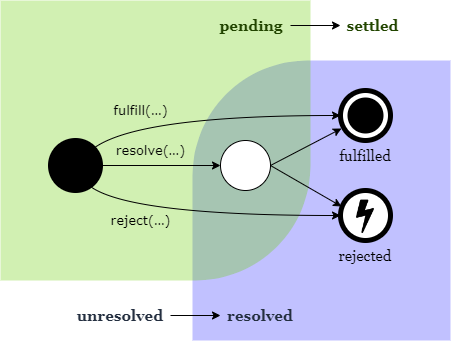
resolve() has a line to the white circle and does not immediately fulfill because if resolve() receives a Promise as an argument, the final result is not yet known.
References:
That’s a brief overview of Promise. There are many more details about Promise and its handling available online. Next, I will discuss one more topic related to Promise: async/await.
References
- https://developer.mozilla.org/en-US/docs/Web/JavaScript/Reference/Global_Objects/Promise
- https://developer.mozilla.org/en-US/docs/Web/JavaScript/Guide/Using_promises
- https://developer.mozilla.org/en-US/docs/Web/API/HTML_DOM_API/Microtask_guide
- https://www.joshwcomeau.com/javascript/promises/#rejected-promises-8
- https://github.com/domenic/promises-unwrapping/blob/master/docs/states-and-fates.md