The concept of asynchronous programming in Javascript is very important because it allows applications to run responsively and quickly, even when other processes are running simultaneously.
Many activities in the browser can take quite a long time to complete, such as:
- Fetching data from the backend using the
fetch()function - Performing heavy iterations or calculations
If these time-consuming activities are executed synchronously, the user experience of the website or application becomes suboptimal, because they have to wait for one process to finish before running the next process.
Here I will start by discussing synchronous programming to better understand why asynchronous programming becomes a necessity.
Synchronous programming
Javascript is a language that by default runs programs synchronously. This means that the program code will be executed sequentially from beginning to end, line by line.
The synchronous process is sometimes also called blocking, because the execution of code lines will be blocked until the previous code line has finished executing. Look at the following code:
The execution of the code above will definitely produce the same order, no matter how many times it is run. The output “Hello Too!” cannot possibly appear first. Because each line of code is executed after the previous code is completed in sequence.
Asynchronous programming
The natural behavior of Javascript that executes program code synchronously will need different treatment when encountering heavy programs whose processes take a long time. Look at the code in the following editor
- It doesn't show some errors, like ReferenceError when accessing an undefined variable
- It does batching, so if there is a long-running code execution, the log won't reflect the delay of the long-running execution.
The code executed above is an example of a program that requires quite a long time depending on the computer’s speed. Even more iterations could make the browser unresponsive and crash.
The effect is that the next program will only run after the first process is complete, and this is ineffective.
If we analogize it with daily activities, suppose there are 5 tables in a restaurant. To be able to eat, customers must go through 3 processes: ordering, cooking the order, delivering the order to the table. Which is more effective:
- orders are placed, cooked, and delivered in sequence for each table sequentially.
- or, orders are collected first, then cooked (if there are the same menu items they can be done simultaneously), then delivered according to the available food.
Of course the second option is much more effective, this is one example of an asynchronous process in the real world.
The previous code can be made asynchronous with the help of the setTimeout() function, so it doesn’t block the next line of code.
- It doesn't show some errors, like ReferenceError when accessing an undefined variable
- It does batching, so if there is a long-running code execution, the log won't reflect the delay of the long-running execution.
The setTimeout() function works by scheduling a piece of program code (called a callback) to be executed after a certain time. The callback that is used as an argument is stored first in a queue, so that other processes can run directly.
A glimpse of how Javascript works
Javascript is a single-threaded language, it can only run one task at a time (synchronous). So how can Javascript run asynchronous processes?
To have a clearer picture of how asynchronous processes work, let’s explore a little deeper into how Javascript works. Look at the following illustration.
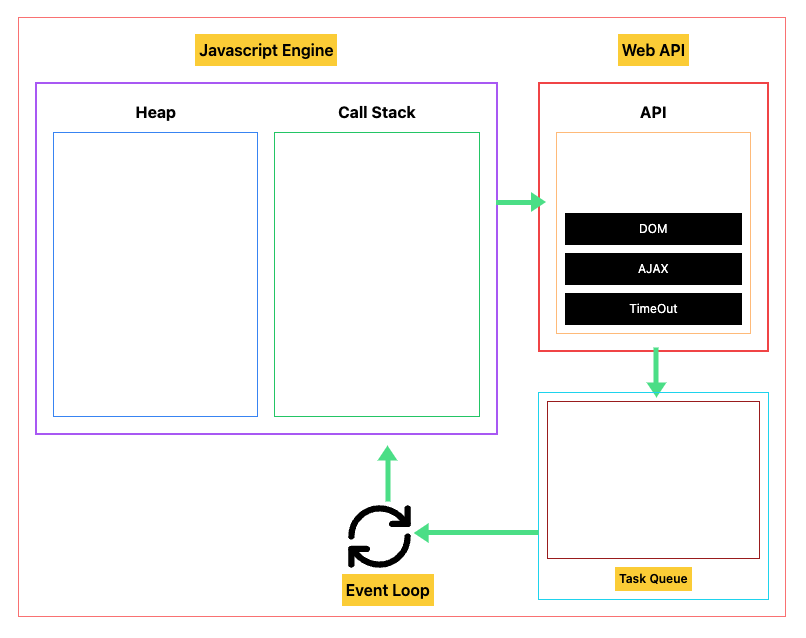
The illustration above is a simple overview of each component that plays a role in running Javascript programs in the browser (javascript runtime). Here is a brief explanation of each component
- JavaScript Engine is software that executes JavaScript code. This engine compiles JavaScript code into machine code that can be executed by the CPU. In addition, the JavaScript engine also manages memory and performs optimizations (examples: v8, SpiderMonkey).
- Heap is a memory area used to store data in the form of Objects, arrays, and functions.
- Call stack is a stack data structure that contains function invocations and manages their order. Every time a function is called (invoke), a new frame is added to the stack. When the function finishes executing, that frame is removed.
- Web API is a collection of APIs provided by the browser that allow JavaScript to interact with web elements (DOM). Examples include
setTimeout,fetch, event handling, Geolocation, and others. - Task queue is a place to store asynchronous processes when the call stack is still filled.
- Event loop is a mechanism that manages the execution of asynchronous code. This mechanism works by checking whether the call stack is empty, if yes and there are processes stored in the queue then they will be moved to the call stack to be executed.
I will use the last code that was tried before, to demonstrate how the code runs inside the Javascript runtime.
function heavyComputation() {
  let sum = 0;
  const iterations = 10000;
  for (let i = 0; i < iterations; i++) {
    for (let j = 0; j < iterations; j++) {
      sum += Math.sqrt(i * j) * Math.cos(j);
    }
  }

  console.log("calculation finished, number is: " + sum);
}

console.log("Starting heavy computation...");
setTimeout(heavyComputation);
console.log("code finished");Look at the interactive simulation of the code above in the following widget. Use the right and left arrow buttons to navigate code execution, and reset to repeat.
Javascript Engine
Heap
Call Stack
Event Loop
Web API
API
Task Queue
It’s clearer now how a Javascript program code runs, isn’t it? If you want to try a more dynamic simulation, you can check out this tool.
Single Threaded Language
When reading on the internet, you may have come across statements that languages like Javascript and Python are single threaded languages.
A Thread is the smallest execution unit of a process (program being executed) that runs on a processor. Each thread has its own call stack, which contains the execution context of the currently running program.
Because JavaScript is a single-thread language, JavaScript only has one call stack, which means JavaScript can only run code synchronously. However, Javascript has an event-loop mechanism that allows it to work on a program asynchronously.
Multi-thread languages like Java and C++ have the ability to run programs in parallel by dividing program execution into multiple threads that have their own call stack.
JavaScript was designed to be a single-thread language because of the environment in which it runs – the browser. When JavaScript was created in 1995, its main use was to add interactivity to static web pages. At that time, computers were much slower than they are now, and the amount of processing power available was limited. To keep the language simple and efficient, JavaScript was made single-threaded.
Quiz
Before continuing to the next discussion about Callback, do the following quiz. Guess what output will appear in the console.